


One Nation, Many Assets
Tribal governments and their enterprises manage an uniquely wide range of physical assets. A single nation might operate a casino resort, a hotel, a fuel station, a health clinic, a housing authority, a public works department, and a fleet of government vehicles. Each of those operations depends on equipment that must run every day.
Think about the rooftop HVAC units that keep a 300-room hotel comfortable in July. Or the pickup trucks, snowplows, and transit vans that carry tribal staff and elders across the reservation. When one of those assets fails; guests complain, services stop, and money leaves the nation faster than it should.
Yet in many tribal organizations, those assets are tracked in spreadsheets, whiteboards, a standalone work order tool, or the memory of one long-tenured facilities manager. Finance keeps its own list for depreciation. Purchasing keeps another for parts. None of them talk to each other. This has been the norm for many years, but now there is a better way.
The Hidden Cost of Spreadsheets and Silos
Spreadsheets are easy to start and yet hard to scale. They work great when one person owns them. Where their usefulness starts to break down is when staff across a casino, a hotel, and/or government departments all need the same information at the same time.
The symptoms are familiar:
- Duplicate records. The same asset exists in the facilities spreadsheet, the fixed asset register, and a vendor's service portal, each with different details.
- Missed maintenance. Filter changes and oil changes depend on someone remembering, so they slip until something fails.
- No true cost of ownership. Finance knows what a vehicle cost to buy and how it is depreciating, but not what it costs to keep running.
- Weak audit trails. When a grant auditor or the tribal council asks how federally funded equipment has been maintained, the answer takes days to assemble.
- Knowledge that walks out the door. When a key employee retires, the history of every asset they cared for often goes with them.
The real problem is not the spreadsheet itself. It is that asset data lives apart from the financial and operational systems that should be using it.
Asset Tracking That Starts with One Record
For Tribal Nations utilizing Dynamics 365 Supply Chain Management for their inventory system, the Asset Management module is a gamechanger. The module gives every piece of equipment a single maintenance asset record. That record holds the asset type, manufacturer, model, serial number, warranty, counters, documents, and full work order history.
Assets are organized by functional location, which is simply where an asset is installed. A hotel might be structured as Property > Building > Floor > Mechanical Room, with each rooftop HVAC unit installed at its own location. A government fleet might be structured by department, with each vehicle assigned to Public Works, Housing, or Elder Services.
Linking to the Fixed Asset Record
This is where an integrated system pulls ahead of standalone maintenance software. In Dynamics 365, a maintenance asset can be linked directly to its fixed asset in the Finance module. Finance can create the maintenance asset right from the fixed asset record, or operations can associate an existing asset with its fixed asset number.
Once linked, the two teams are looking at the same asset from different angles. Finance sees acquisition cost, depreciation, and book value. Operations sees condition, maintenance plans, and open work. And from the fixed asset record, finance can open a Maintenance cost view that shows every cost posted from work orders against that asset. For the first time, the Nation can see the total cost of owning a rooftop unit or a patrol vehicle, not just the purchase price.
Asset Management in D365 expands beyond just linking with Fixed Assets, but connects with nearly all areas of the D365 ERP to break down data silos where it matters most to your organization.

Asset Management connected modules in Dynamics 365
Preventive Maintenance: Fix It Before It Breaks
Preventive maintenance is where most of the savings live. In Dynamics 365, maintenance plans define when planned work should happen. Each plan can include two kinds of lines:
- time-based
- counter-based
The hotel HVAC example: A time-based plan might call for filter changes every quarter, coil cleaning twice a year, and a full inspection each spring before the summer rush. Seasonal settings let you schedule that spring inspection within a set window every year. Attach the plan to the HVAC asset type, and every new rooftop unit you add picks it up automatically.
The government vehicles example: A counter-based plan tracks usage instead of the calendar. An oil change every 5,000 miles, a tire rotation every 7,500, and a brake inspection when pad thickness drops below a set measurement. Because the system projects future service from the trend in odometer readings, a truck driven hard gets serviced sooner than one that sits in the motor pool.
A scheduled batch job turns these plans into maintenance schedule lines, and can create work orders automatically. Maintenance rounds group related jobs, so a technician can inspect every HVAC unit on a building roof in one trip rather than ten. Planners stop chasing calendars, and nothing depends on someone's memory.
Break/Fix: When Something Goes Wrong Anyway
Even the best preventive program will not stop every failure, such as a compressor quitting on a holiday weekend, or a transit van failing to start on a cold January morning. What matters is how quickly the problem gets reported, routed, and fixed.
How People Request Service
In Dynamics 365, that process starts with a maintenance request. A maintenance request is a notice that an asset may need attention, without committing to a work order yet. The flow is simple:
- Someone reports the issue. A hotel front desk agent logs a guest complaint about a room that will not cool. A fleet driver reports a warning light. They choose the asset or location, describe the problem, set a service level for urgency, and attach a photo.
- The system checks for duplicates. If an open request already exists for that asset, the requester is told, so ten reports of the same broken ice machine do not become ten work orders. It also flags when the asset is still under warranty, which can save the cost of the repair entirely.
- A planner reviews and converts it. Valid requests become work orders with the right job type, trade, parts, and checklist. Photos carry over to the work order.
- The work gets done and the cost is captured. Labor, parts, and outside services post back to the asset, and through the fixed asset link, to finance.
Technicians can also record fault symptoms, areas, and types. Over time, that data shows which models fail most often and why, which is exactly what you need before the next capital purchase decision.

Sample Process Flow: Creating Work Orders
Putting the Work Order in the Technician's Hand
Technicians don’t work at desks. They work on rooftops, in mechanical rooms, and in the vehicle shop. The Asset Management mobile app meets them there. Built on Microsoft Power Apps, it connects directly to Supply Chain Management, so there is no separate system to keep in sync.
With the app, a technician can:
- See the jobs and work orders assigned to them, sorted by service level or scheduled start.
- Work through the maintenance checklist, including measurements like supply air temperature or tire tread depth.
- Record time spent and parts consumed, choosing from the asset's spare parts list.
- Add notes and photos and update the work order status when the job is done.
- Scan a barcode or QR code on an asset to pull up its history or file a new maintenance request on the spot.
That last point matters especially for tribal organizations. Put a QR tag on every HVAC unit, ice machine, and fleet vehicle, and anyone with permission can report a problem in seconds.
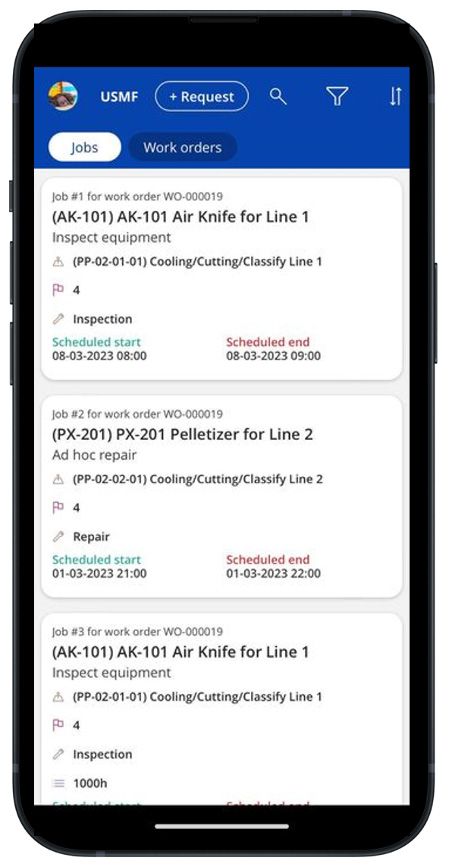
Asset Management mobile app preview
Spare Parts, Purchasing, and Costs That Reach Finance
Maintenance runs on parts. In a disconnected setup, the shop keeps its own stock of filters, belts, and brake pads, and nobody outside the shop knows what is on the shelf until it runs out.
Because Asset Management is part of Supply Chain Management, spare parts are regular inventory items. Each asset can list the parts it uses. Work orders reserve those parts from the warehouse. When stock gets low, standard replenishment and purchasing processes take over, with the same approval workflows and vendor records that the rest of the nation already uses. Outside services, like a contracted HVAC specialist or a body shop, can be purchased against the work order too.
Every hour and every part posts through journals tied to the work order. The result is real-time maintenance cost by asset, by location, by department, and by enterprise. No month-end rekeying. No reconciling a work order tool against the general ledger.
Built for How Tribal Organizations Are Structured
Tribal Nations rarely run as one company. The government, the gaming enterprise, and the economic development corporation are often separate legal entities with their own books, their own boards, and their own reporting requirements. Dynamics 365 handles this with multiple legal entities on a single platform. Each enterprise keeps its own assets and financials, while leadership gets a consolidated view across the Nation.
That structure also supports the reporting tribal organizations are asked for most:
- Grant compliance: Equipment bought with federal funds, from BIA, IHS, HUD, or DOT programs, often comes with rules for tracking, maintenance, and disposition. When the maintenance asset, the fixed asset, and the funding source are connected, proving stewardship becomes a report instead of a research project.
- Capital planning: Maintenance cost history, fault trends, and asset age show which HVAC units and vehicles to replace next year, and which can wait.
- Downtime and service levels: Track how long assets are out of service and how quickly requests are resolved, by property or department.
- Leadership dashboards: Power BI reports on top of Dynamics 365 give tribal council, gaming commission, and enterprise executives the same view of asset health and spend.
And as AI agents become part of daily work, a single, clean asset record is what makes it possible to simply ask, "Which rooftop units at the hotel are overdue for service?" and get a trustworthy answer.
Getting Started Without Boiling the Ocean
Moving off spreadsheets does not require doing everything at once. A practical path looks like this:
- Start with the assets that hurt most. For many Nations, that is hotel HVAC and the government fleet. High cost, high visibility, and easy to measure.
- Clean up the asset list. Reconcile the facilities spreadsheet against the fixed asset register, and decide on functional locations and asset types.
- Link maintenance assets to fixed assets. This is the step that connects operations and finance.
- Load maintenance plans. Use manufacturer recommendations and your team's experience to set time and counter intervals.
- Roll out requests and the mobile app. Tag assets, train requesters, and put the app in technicians' hands.
- Add gaming floor equipment, clinics, housing, and utilities once the process is proven.
Asset management is ultimately about stewardship – taking care of what the Nation has built, so it serves the community for years to come. An integrated platform built on Dynamics 365 Finance and Supply Chain Management turns that stewardship from a spreadsheet exercise into a daily practice with one record, one process, and one view of the truth.
Arctic IT has worked with tribal governments and enterprises for years and understands the structure, funding, and reporting that make these organizations unique. If you are ready to move your assets out of spreadsheets and into an integrated solution, connect with Arctic IT today.
By Matt Borkowski, Director of Business Applications Sales at Arctic IT
