


Purchase requisition PunchOuts for Dynamics 365 (D365) Supply Chain Management is a form of e-procurement that automates purchase flows from external vendor websites. With PunchOuts, employees can shop within an approved vendor’s online catalog by starting and completing the purchasing process in D365. Let’s dive into a scenario that demonstrates how this works.
Your staff member needs a new chair, so he went to his manager for approval. She said to visit the Staples website and pick one out, then fill out a purchase requisition in D365.
So, he opens D365 in one browser tab, and Staples’ website in another – and flips back and forth as he finds what he wants, then manually types in all the details into the requisition line. Aside from the fact that he’s going to try to get away with the $450 leather executive chair, he may give a generic description on the line, and may even type in the price incorrectly.
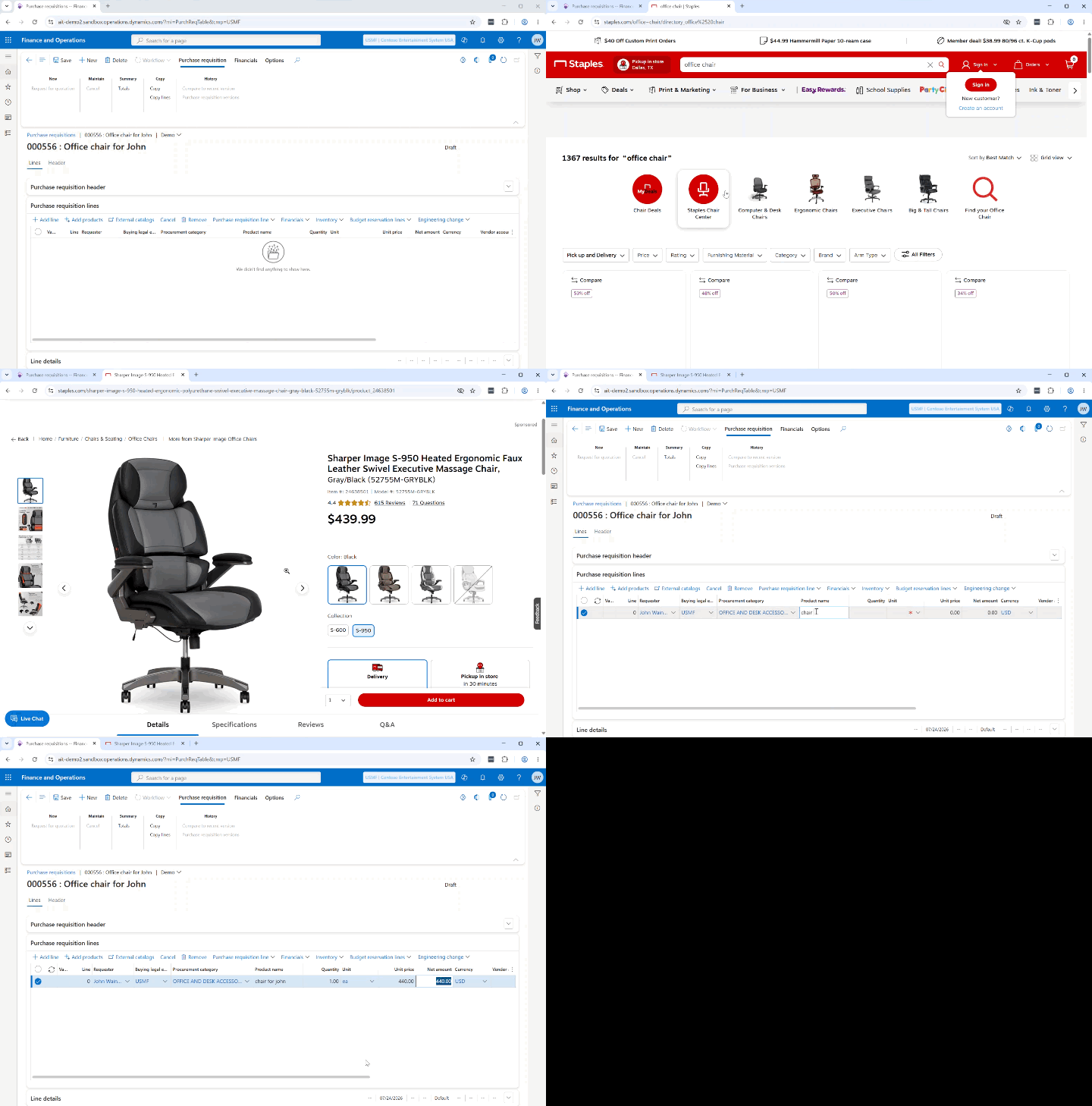
This is a common scenario, and its drawbacks are obvious. It’s time-consuming, prone to errors and typos, and affords little-to-no control over what requesters are attempting to purchase.
Just because your staff member needed a new office chair, doesn’t mean he gets to buy the high end $450 leather one. This just causes inevitable delays, as his initial request gets denied in workflow, and then he has to re-do his requisition for an “approved” chair.
How Purchase Requisition PunchOuts Work in Dynamics 365
With a purchase requisition PunchOut configured, instead of adding a line on the requisition, you can click the “External catalogs” button in the requisition and a list of configured punchouts will appear to the right. Simply select the vendor you want to purchase from, and then leave D365 and arrive on the vendor’s website. From there, you can shop around as you normally would, browsing for products and adding the ones you want to your cart.
When you go to check out on the vendor’s website, instead of placing an order, the system grabs those items out of the vendor cart and brings them back into D365, where they’re automatically inserted as lines into your requisition.
Everything comes over:
- Procurement category.
- Vendor’s exact product description.
- Correct pricing.
- Vendor item or SKU number.
No manual entry, so no more typos!
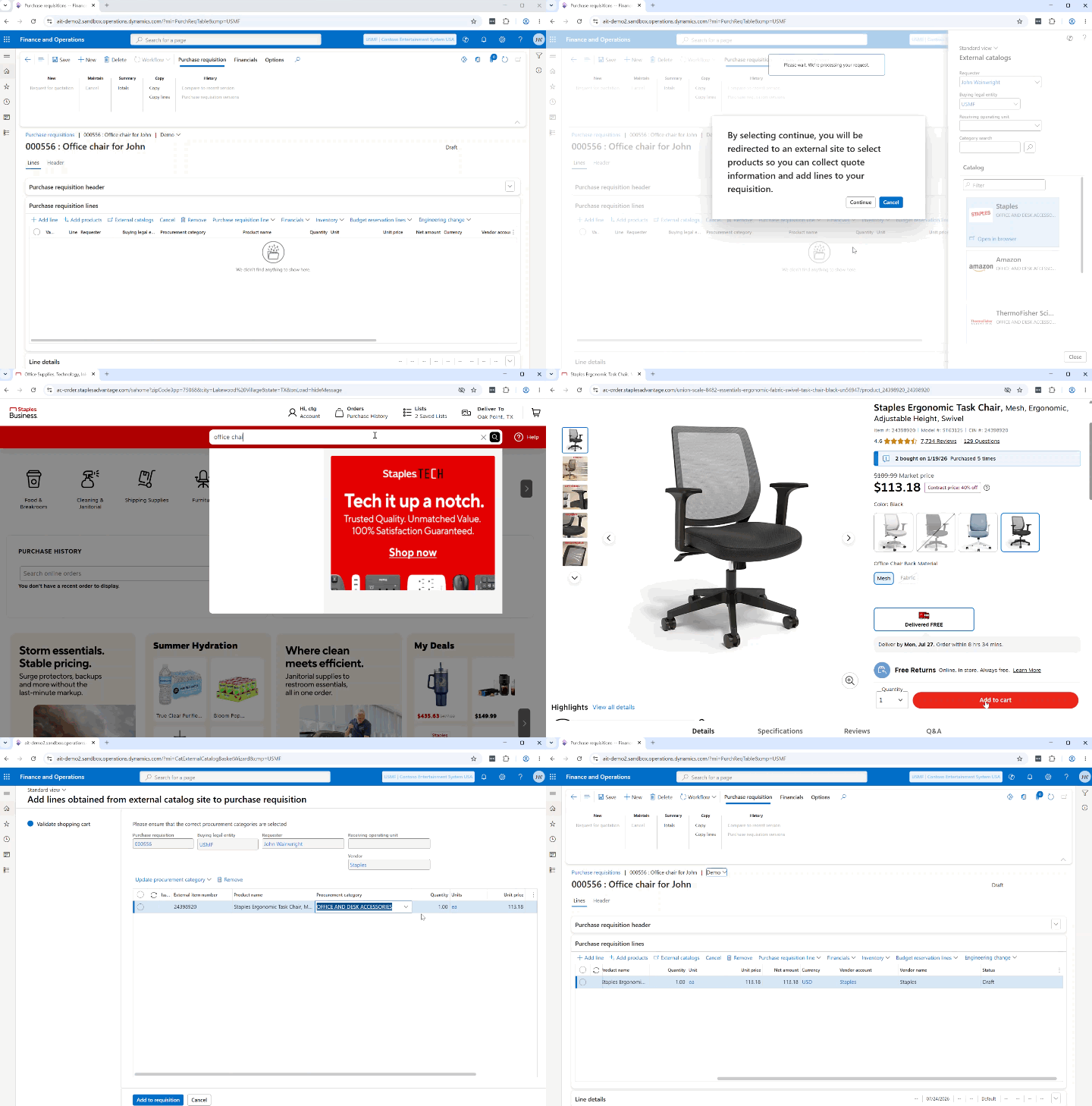
Aside from being faster, the purchase requisition PunchOut offers much greater control over the items being purchased.
The PunchOut external catalog, configured by your vendor, is restricted to only those products you approve for purchase. You’ll coordinate with your vendor which products you want to have displayed in your punchout catalog. Some of the most popular vendors that support cXML PunchOuts include Amazon, Home Depot, Lowe’s, Staples, Grainger, ThermoFisher, Office Depot, ULINE, Henry Schein, KCS, PYO, ESPO, MEDLINE, McMaster-Carr, RS Components – and thousands more.
This avoids frustrating back and forth debates about exactly which product the staff member wants, versus what they can have. In the PunchOut, they’ll only see products that have been pre-approved for purchase.
The PunchOut is also more accurate on pricing. When staff members browse the vendor’s public website, they see the vendor’s default price. However, you may have negotiated a better price on certain items without the staff members’ knowledge. Without a PunchOut, that mismatch causes pricing discrepancies and additional delay, as prices need to be updated later.
With the PunchOut, staff see your negotiated price – and that’s what is brought back to the requisition in D365 and locked into the PO.
PunchOuts are faster, more accurate, and afford greater control over your purchases
By now, you may be wondering, ‘do my vendors support Punchouts?’
The answer is probably yes. The cXML PunchOut protocol is not D365-specific. It’s an industry standard and is supported by thousands of vendors big and small. You’d probably be surprised at the amount of mom-and-pop shops that support PunchOuts, right alongside the big box stores mentioned above.
D365 Supply Chain Management PunchOuts are quick to implement (no code needed!) and offer huge benefits for little effort.
If you’re ready to add PunchOuts to your D365 system, Arctic IT can help. Our Microsoft certified consultants are experienced in guiding organizations on D365 Finance and Supply Chain Management implementations. Connect with us today to get started.

By John Wainwright, Senior Client Services Consultant at Arctic IT