


This guide breaks down how to automate financial workflows in Microsoft Dynamics 365 Finance, using tools like Power Automate, Copilot for Finance, and Business Performance Planning to streamline accounting, improve accuracy, and reduce manual workload.
Financial teams are under growing pressure to do more with less while managing higher transaction volumes, increasing regulatory requirements, and the demand for real-time insights. Microsoft Dynamics 365 Finance helps meet these challenges by automating key financial workflows, improving accuracy, and giving finance teams the tools to plan and act with confidence.
Many organizations adopt Dynamics 365 Finance as part of a broader shift toward modernizing financial operations and reducing reliance on legacy systems.
Workflow Automation for Core Financial Operations
Routine accounting activities such as invoice processing, payment management, budget planning, and account reconciliations can consume a large portion of a finance team’s time. Dynamics 365 Finance automates many of these tasks, reducing manual entry and the risk of errors through automated financial workflows.
By integrating workflows with other processes including procurement, inventory, and project management, the system ensures data remains consistent across the organization. As a result, finance and accounting staff benefit from faster month-end closes, improved data reliability, and more time to focus on analysis rather than administration.
The platform’s flexible workflow engine supports both simple and multi-step financial processes, making it easier to align automation with existing accounting policies.
Extending Dynamics 365 Finance Workflows with Power Automate
Dynamics 365 Finance workflows can be extended using Power Automate, allowing finance teams to complete approval steps directly from Microsoft Teams or email without logging into the ERP system. This integration streamlines Finance approval processes for items such as purchase orders or journal entries and provides greater accessibility for non-finance users. It can also help reduce delays, improve accountability, and ensure financial controls are applied consistently across the organization.
By enabling the Power Automate Options Action Menu Items feature in the Dynamics 365 Finance Feature Management workspace, Power Automate will become easily accessible directly in the taskbar under the Options tab across the system.
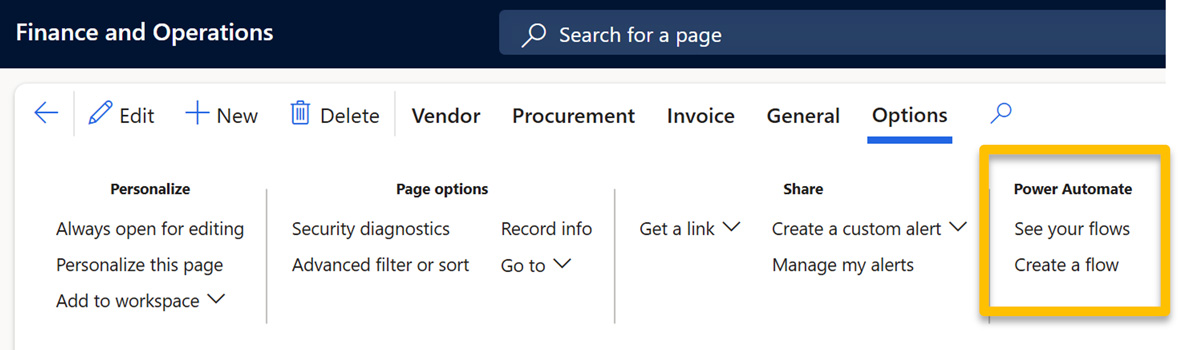
The key features of Power Automate for Dynamics 365 Finance include
- Flow creation – Simply create automated tasks and procedures with a no-code interface, using either custom designs or pre-built templates for specific needs.
- Integration capabilities – Effortlessly integrates with Microsoft 365 (Outlook, Excel, SharePoint, Teams) and third-party platforms (Salesforce, Dropbox, Google Workspace), allowing automation across your whole digital ecosystem.
- Pre-built connectors – Access a wide array of connectors for quick integration with various applications and data sources, simplifying the automation process and accelerating deployment.
- Fin & Ops Connector (uses Data Entities)
- Dataverse Connector (uses Virtual Entities)
- Error handling and conditional logic – Integrate error handling and conditional logic to build dynamic workflows that can adapt to problematic scenarios and guarantee seamless operation.
In addition, there are hundreds of pre-built templates in Power Automate that can be used to automate tasks within Dynamics 365.
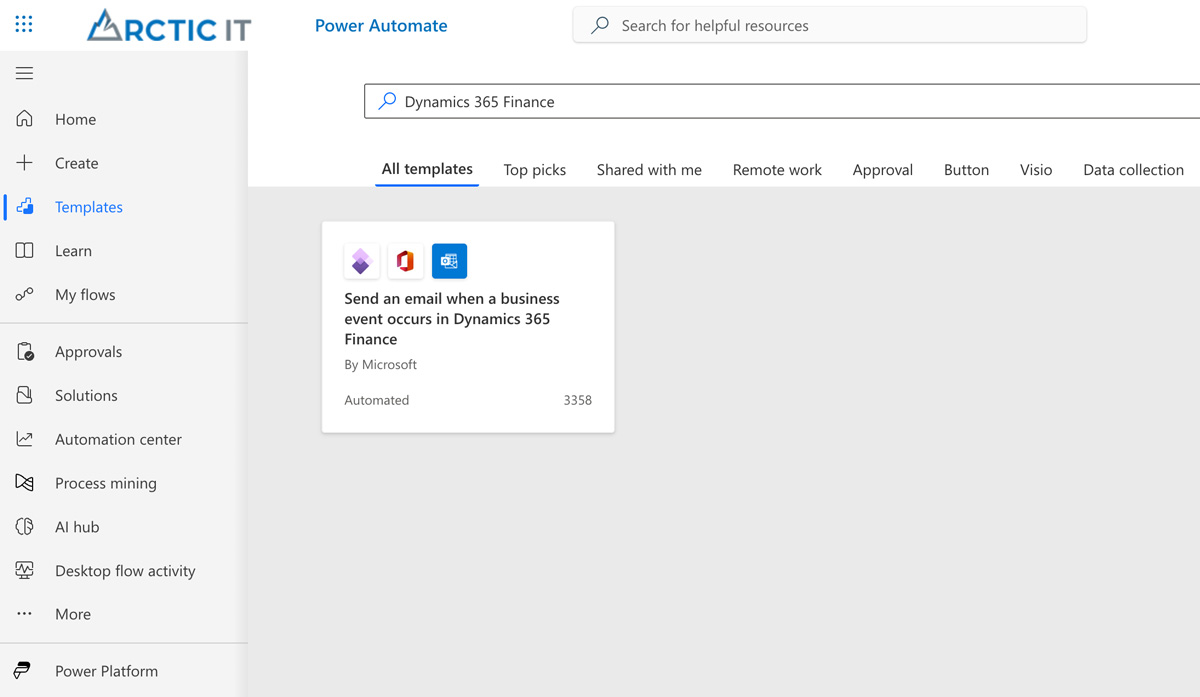
Sample Dynamics 365 Finance template available in Power Automate
Vendor Onboarding Automation
Vendor onboarding is another key area where Dynamics 365 Finance can benefit from process automation. For organizations looking for more than what the out-of-the-box functionality can provide, you can leverage other tools within the Microsoft cloud ecosystem to get even better results.
Using Microsoft Forms, Dataverse, and flows built with Power Automate, vendors can securely submit their details through a form, which automatically creates vendor records in the ERP system via automated data entry. The system can then send acknowledgment emails or required documentation such as W-9 forms for tax compliance.

This automation example reduces manual data entry, accelerates vendor setup, and ensures consistent application of procurement and compliance policies.
Forecasting and Budgeting with Business Performance Planning
Accurate budgeting and forecasting are central to effective financial planning and analysis (FP&A). The Business Performance Planning feature in Dynamics 365 Finance supports this by combining real-time data, predictive analytics, and scenario modeling.
Finance teams can:
- Create flexible budgets that adjust to new data or market changes.
- Run what-if scenarios to test assumptions and prepare for different outcomes.
- Consolidate financial data automatically from multiple sources.
This approach gives decision-makers timely, consistent information and reduces the effort needed to produce forecasts or revise budgets.
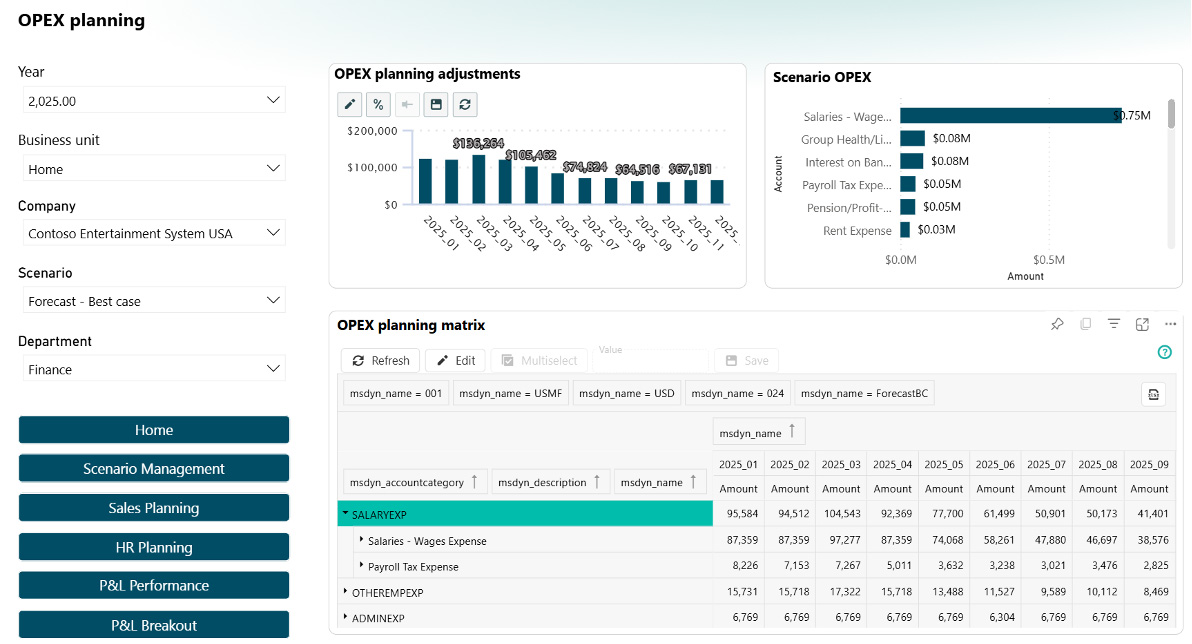
Business Performance Planning feature preview
Improving Accuracy with the Account Reconciliation Agent
The Account Reconciliation Agent in Dynamics 365 Finance is an AI tool that automates the account reconciliation process – helping organizations identify and resolve discrepancies quickly. It works autonomously throughout the month matching transactions, flagging exceptions, and provides a clear audit trail.
This tool learns its users’ preferences and paths to resolution over time, so the suggested actions it creates will increasingly become more tailored to the organization’s business practices.
The net result is a faster month end close with less manual work.
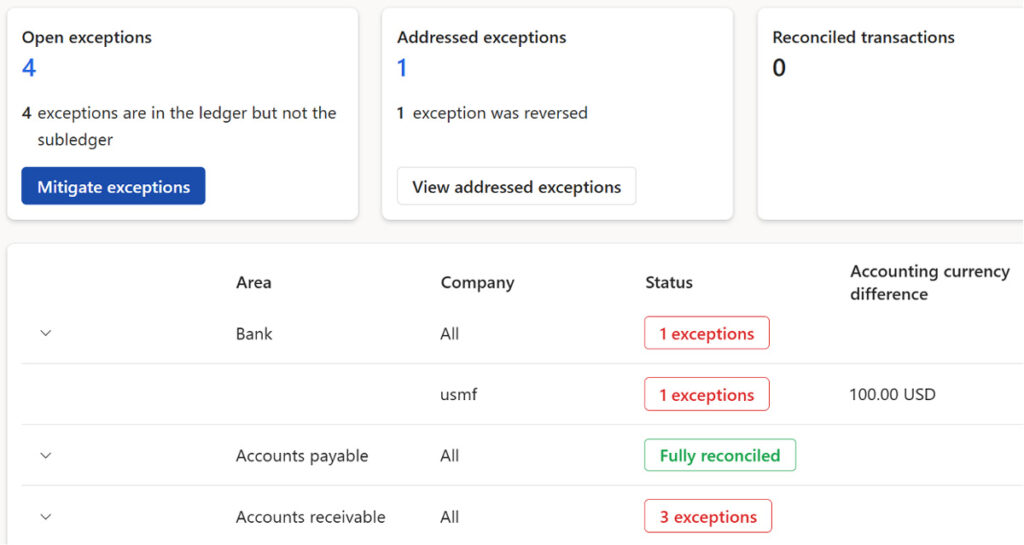
Flagged exceptions with the Account Reconciliation Agent
Integrating Legacy Data with Copilot for Finance
Copilot for Finance extends the automation capabilities of Dynamics 365 Finance by connecting to legacy data sources and reconciling them with the ERP system. This feature helps organizations that still depend on older accounting or transactional systems to bring historical and off-platform data into the Dynamics 365 environment.
Through AI-driven mapping and data transformation, Copilot helps finance teams identify discrepancies, match historical entries, and establish a unified financial dataset. This connection improves data consistency across systems by strengthening reporting accuracy and ensuring all information is reconciled on one central platform.
Strengthening Compliance and Internal Controls
Finally, keeping up with changing regulations and internal governance requirements can be complex. Dynamics 365 Finance assists by automatically applying updates to financial and tax standards, maintaining audit trails, and supporting rule-based workflows for approvals and compliance checks. These automations help reduce risk, support accurate reporting, and simplify audits.
Scalable and Future-Ready Financial Management
As organizations grow, financial operations become more complex. Dynamics 365 Finance is built to scale across multiple entities, currencies, and regions. Its cloud-based architecture supports flexibility, enabling teams to add users, expand capabilities, or integrate advanced analytics tools as business needs evolve.
This scalability makes it the ideal solution for businesses looking to future-proof their financial procedures.
Get Started on Your Path to Automating Financial Workflows with Dynamics 365
Automation in Dynamics 365 Finance, combined with the Account Reconciliation Agent, Copilot for Finance, Business Performance Planning, and Power Automate helps finance teams work more efficiently and accurately. These tools simplify routine processes, improve forecasting, and support compliance – allowing organizations to focus their efforts on insight, planning, and strategic growth.
If you’re ready to make the move to Dynamics 365, or you’re new to Dynamics 365 Finance and need help with automating workflows, we can help. Arctic IT has over two decades of experience implementing and supporting Microsoft Dynamics financial systems. Connect with us today to get the conversation started.

By David Schwantes, Pre-Sales Solution Architect D365 Finance, SCM, Commerce at Arctic IT