


Microsoft Entra ID is a cloud-based identity and access management (IAM) service that plays a crucial role in securing user authentication and authorization. Formerly known as Azure Active Directory (AD), it goes beyond conventional directory services. Entra ID is the identity layer that connects users to every Microsoft service they use, and increasingly, to the broader ecosystem of SaaS and hybrid cloud environments beyond Microsoft.
As organizations adopt cloud services and remote work models, identity governance has moved from a background IT function to a front-line security priority. The right IAM approach balances security with user productivity ensuring the right people have the right access, at the right time, without friction that slows them down.
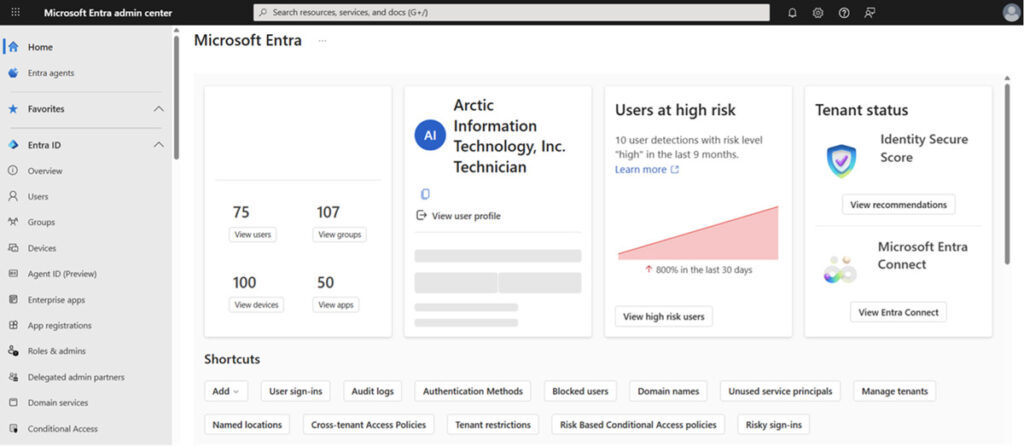
Microsoft Entra admin center dashboard
What is Microsoft Entra ID?
Microsoft Entra ID is the identity management tool within Microsoft Entra, Microsoft’s unified identity and access management suite. It simplifies IAM processes, strengthens security protocols, and provides centralized management with seamless integration across Microsoft and third-party services.
- It handles authentication and authorization for:
- Internal users accessing company applications and data
- Remote workers signing in from personal or unmanaged devices
- External partners and customers collaborating through B2B and External ID
- Applications and services that need secure, credential-free access via Managed Identities
Entra ID enables seamless access across Microsoft 365 services such as Exchange, Teams, and SharePoint without frequent sign-ins. Its integration with hundreds of SaaS applications outside of Microsoft allows businesses to maintain a unified identity strategy across diverse cloud environments.
Why Are Organizations Embracing Entra ID?
Entra ID has become the identity standard for Microsoft environments for four primary reasons:
Security enhancement
Entra ID offers strong protection against the most widespread attack vectors through phishing-resistant MFA, conditional access policies that stop risky sign-ins, and Identity Protection that automatically detects suspicious activities such as impossible travel or compromised credentials. It also reduces exposure by providing just-in-time administrative access through privileged identity management (PIM).
Productivity gains
Team members can access all their applications via a single set of credentials, removing password fatigue and decreasing IT support costs with single sign-on (SSO) and passwordless authentication.
Modern collaboration enablement
Entra ID supports secure remote work and modern collaboration by allowing staff, customers, and partners access to shared resources using their own credentials through External ID and B2B collaboration.
Regulatory compliance
Built-in tools help companies meet increasingly stern security and privacy regulations. Entra ID provides audit-ready access logs, automated access reviews, and strong controls such as multi-factor authentication (MFA) and conditional access, which align with frameworks like SOC 2, ISO 27001, GDPR, HIPAA, and PCI DSS.
Key Features of Microsoft Entra ID
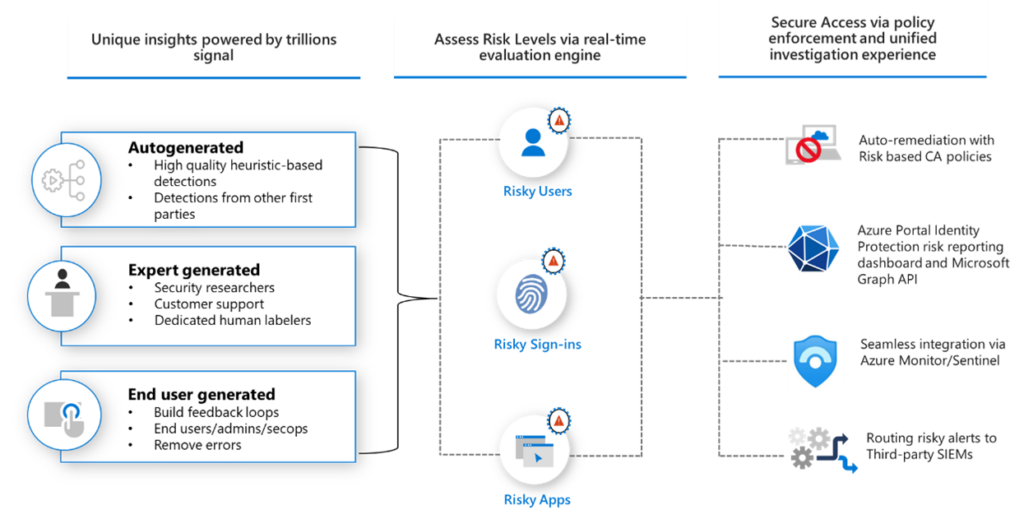
Microsoft Entra ID Protection overview
Image Source: What is Microsoft Entra ID Protection? - Microsoft Entra ID Protection | Microsoft Learn
Here is what Entra ID actually does, and why each capability matters:
- Identity protection – Use advanced threat intelligence to spot and respond to suspicious activities in real time. By analyzing user sign-in patterns and behavior, it can recognize anomalies and trigger adaptive security measures to stop data breaches and unauthorized access attempts.
- Single sign-on (SSO) – Access Microsoft apps, on-premises systems, cloud services, and software-as-a-service (SaaS) platforms with a single set of credentials. This not only improves user experience but also decreases the risk associated with repeated password entries.
- Multi-factor authentication (MFA) – Increase fortification of security through Entra ID's support for MFA, which brings an additional layer of verification beyond passwords. By requiring additional factors like one-time passcodes, biometrics, and phish-resistant authentication methods like FIDO2 security keys or Windows Hello, it significantly reduces the risk of unauthorized access attempts.
- Conditional access policies – Enforce granular access controls based on conditions, like sign-in risk, user location, and device compliance. This dynamic approach to access management guarantees that security measures adjust to changing threats and compliance requirements.
- Privileged identity management (PIM) – Gain robust capabilities for managing privileged identities. By including session monitoring, approval workflows, and just-in-time access, companies can lessen the risk associated with elevated privileges.
- End-user self-service – Enable users to oversee their own identities, including resetting passwords, unlocking their accounts, and reviewing their app access. These self-service functionalities lessen helpdesk dependency and let staff members quickly regain access to the tools they need to stay productive.
- Integration with Microsoft 365 – Effortlessly integrate with Microsoft 365 services and applications, to achieve a unified IAM experience. This integration enables smooth collaboration while guaranteeing compliance standards and reliable security protocols.
Microsoft Entra ID Best Practices
Use Privileged Identity Management (PIM)
Privileged Identity Management (PIM) in Entra ID lets administrators monitor, manage, and secure access to highly sensitive resources. One of its most powerful features is Just-in-Time (JIT) access, which ensures that elevated permissions are granted only when required and for a limited duration. This minimizes the exposure of compromised privileged accounts by limiting the period in which elevated access can be used.
Implement Role-Based Access Control (RBAC)
One of the fundamental principles in security is the principle of least privilege. It states that users should only be given the minimum access level necessary to perform their job functions.
Entra ID Governance makes it simple to enforce this principle through Role-Based Access Control (RBAC). RBAC lets organizations define roles that correspond to job descriptions and assign users access necessary to perform these roles. Entra ID also offers a host of built-in roles made to fit common administrative and operational needs, like:
- Global Administrator – Can manage all facets of Entra ID, usually limited to a small number of personnel.
- User Administrator – This is a privileged role that manages user and group lifecycle tasks, including creating accounts, updating group memberships, and password resets.
- Security Reader – Grants read-only access to security policies, alerts, reports, and other security-related features. It is useful for security operations center (SOC) teams or auditors who need insight but don’t necessitate control over configurations.
Following least privilege principles reduces attack surface, prevents privilege creep, and lessens the risks associated with compromised accounts. This approach also helps mitigate both accidental and intentional misuse of elevated access, ensuring that sensitive systems remain controlled and protected.
Actively Audit and Monitor for Suspicious Activities
Continuous monitoring helps businesses find and respond to suspicious activities before they develop into security incidents. Continual monitoring and complete audit logging guarantee that situations like privilege escalation, unauthorized access attempts, or unusual user behavior are swiftly identified and alleviated.
Migrating from Active Directory to Entra ID
For organizations currently using on-premises Active Directory (AD), moving to Entra ID represents a significant shift in identity management. A well-planned approach ensures a smooth transition and reduces disruption across the business.
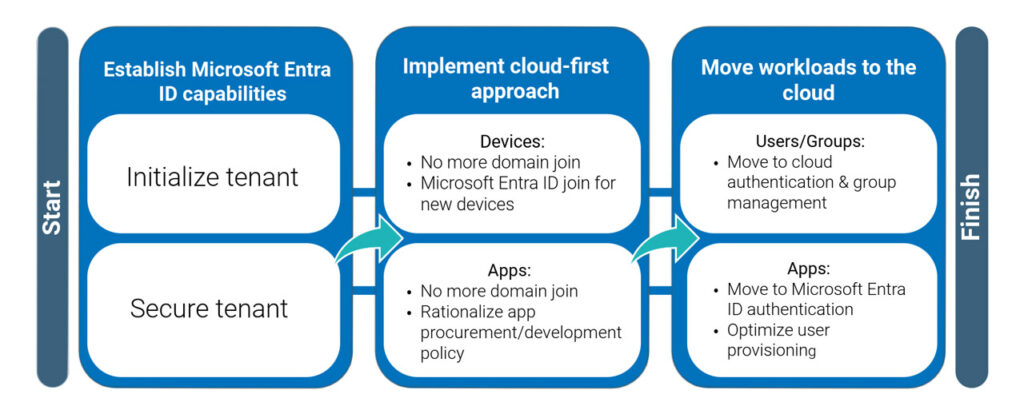
High-level journey for migration from Active Directory to Microsoft Entra ID
Assessment and Planning
Before making any changes, assess the current environment:
- Inventory your current Azure AD infrastructure, including forests, domain controllers, and trust relationships.
- Identify all applications and services that rely on AD for authentication.
- Review existing group policies to determine which settings can transition to cloud-based controls.
- Document identity lifecycle procedures including provisioning, deprovisioning, and role assignment.
- Assess network dependencies, certificate requirements, and devices bound to the domain.
- Evaluate readiness for cloud authentication, including MFA adoption and passwordless options.
Migration Approach
Microsoft offers several pathways for moving from traditional Azure AD to Entra ID, with most organizations following a staged, hybrid approach. A typical migration includes:
- Deploy Azure AD Connect to sync identities between on-premises Azure AD and Entra ID. This enables users to maintain a single identity during the transition.
- Employ password hash synchronization (PHS), pass-through authentication (PTA), or federation, based on security, compliance, and operational needs.
- Gradually move applications to use Entra ID-based authentication through modern protocols such as OAuth or SAML.
- Execute a cutover to shift from on-premises Azure AD to Entra ID as the primary identity control plane once dependencies are ready.
- Once fully transitioned, begin retiring domain controllers, legacy authentication endpoints, and infrastructure that are no longer needed.
Entra ID is more than an IAM tool. It is an identity framework that links users, devices, applications, and cloud services across the organization. It goes beyond authentication, weaving itself into each layer of a company’s compliance, security, and hybrid IT strategy.
Strengthening Cloud Security with Entra ID and Zero Trust Security
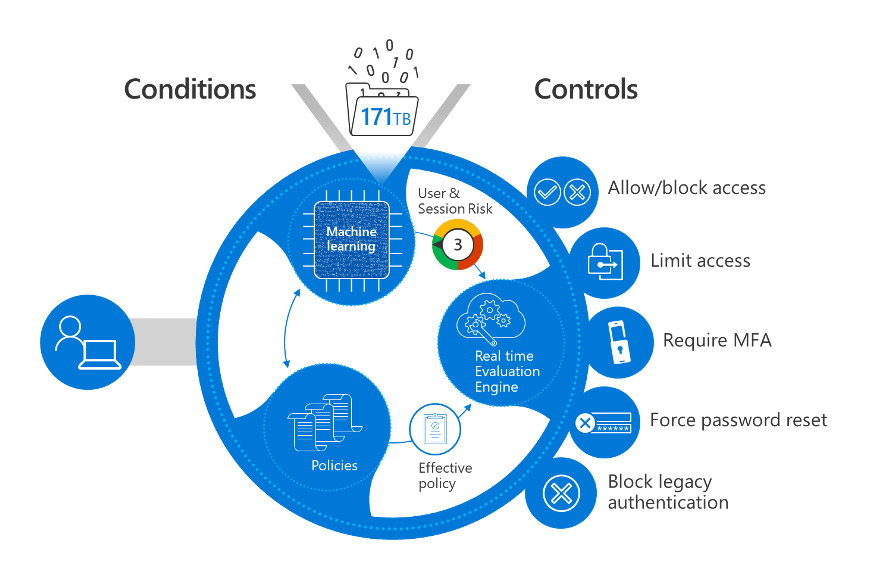
Microsoft Entra ID conditional access policies
Image Source: Identity, the first pillar of a Zero Trust security architecture | Microsoft Learn
Zero Trust is a security philosophy that assumes no user, device, or network request is inherently trustworthy and requires each attempt to be continuously validated. Entra ID enforces Zero Trust principles by evaluating every access request based on user identity, location, device health, and risk level. This approach ensures that:
- High-risk sign-ins require additional verification or are automatically blocked.
- Sensitive data and applications stay protected, even when accessed from personal electronic devices or remote locations.
- Cloud security policies stay consistent across Microsoft and third-party platforms.
For organizations pursuing Zero Trust architecture including those working toward CMMC compliance or federal security frameworks, Entra ID is foundational, not optional.
Entra ID in Multi-Cloud and Hybrid Settings
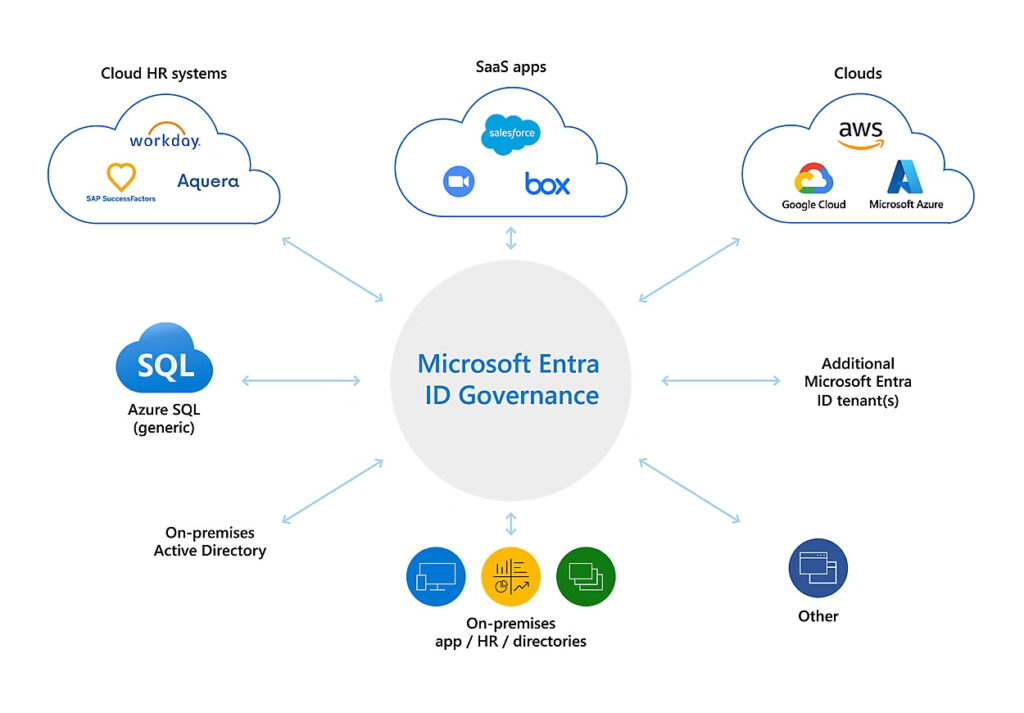
Entra ID governance architecture via user identities and roles
Image Source: Microsoft Entra Identity Governance | Microsoft Security
Most organizations don’t operate in a single-cloud ecosystem. Many run hybrid environments that still depend on on-premises Active Directory, or use a mix of Microsoft, Google Cloud, and other platforms. Entra ID functions as the unifying identity provider across these environments, ensuring that authentication mechanisms, security policies, and access governance stay consistent regardless of where data and applications live.
For hybrid enterprises, Entra ID integrates with on-premises AD through Azure AD Connect, allowing a gradual cloud transition without disrupting existing workflows. Whether an organization is balancing legacy infrastructure with modern SaaS or operating fully in the cloud, Entra ID provides a single, consistent approach to identity management.
Getting Started with Entra ID
Microsoft Entra ID provides a resilient and scalable framework for managing identities and securing access across complex environments, but its effectiveness depends on implementing it using established best practices.
Solid identity governance goes beyond technology. It requires building a culture of security, encouraging continual improvement, and promoting ongoing security awareness throughout the organization.
To learn how Arctic IT can help you with Entra ID governance or any other Microsoft Cloud Solutions, request a complimentary consultation today.

By Kat Del Fierro, GRC Security Analyst at Arctic IT