

Security leaders are facing a new reality. The “perimeter” is gone, identities are the new control plane, and attackers move faster than most teams can investigate. Meanwhile, telemetry is exploding across endpoints, cloud workloads, SaaS apps, identity providers, and network controls.
The problem for most teams is that these threats are often managed through too many disconnected tools. That’s exactly where a modern SIEM (Security Information and Event Management) earns its keep.
A SIEM is more than just a logging tool. It’s a sophisticated system that turns raw security data into prioritized, correlated incidents your team can act on, with automation that helps you respond at the speed you need.
Microsoft Sentinel is Microsoft’s cloud-native SIEM and SOAR (Security Orchestration, Automation, and Response). Sentinel was designed for the current threat landscape, combining broad ingestion, advanced analytics, threat hunting, and automated response in a single platform. It combines with Azure cloud services, offering support for incident response and security analytics. It assists security analysts with investigating, finding, and responding to threats using AI and the power of the cloud.
Below, we’ll cover why organizations need a SIEM today, what makes Sentinel a strong choice, and how Arctic IT helps customers implement and operationalize Sentinel for real outcomes.
4 Reasons why you need a SIEM
1) Tool sprawl creates blind spots and attackers exploit the gaps
Most organizations have strong point solutions (EDR, email security, IAM, CASB, firewall, etc.). The problem is that attacks don’t stay inside one product. A real-world intrusion chains identity events, endpoint behaviors, cloud control-plane activity, data access, and network anomalies. Without a SIEM, those signals remain fragmented and hard to recreate what happened.
2) Detection is only half the battle, response speed is the differentiator
The difference between a contained incident and a material breach often comes down to minutes. A SIEM helps you:
- Detect suspicious patterns earlier through correlation and behavior analytics
- Triage and investigate faster with enriched context and timelines
- Create custom rules and alerts for staff activities
- Automate repeatable actions, so your security team can focus on judgment calls
Sentinel is designed not only for detection and investigation, but also for orchestrated response via built-in automation and playbooks.
3) “Assume breach” requires proactive hunting, not just alerting
Modern security programs don’t wait for the alarm bell. They hunt. Microsoft Sentinel supports proactive threat hunting using KQL (Kusto Query Language) and machine learning to find anomalies that evade standard controls.
4) Compliance, forensics, and retention are now board-level concerns
Whether driven by cyber insurance, regulatory requirements, or incident response readiness, organizations increasingly need:
- Longer log retention
- Faster forensic reconstruction
- Proof of monitoring and response procedures
A SIEM is the operational foundation that turns those requirements into an executable program, especially when paired with well-defined processes and automation.
Why Microsoft Sentinel is the best choice for your organization
Microsoft Sentinel is a cloud-native SIEM + SOAR that applies analytics, threat intelligence, and automation to help teams investigate and respond faster. Here’s what makes it stand out today.
Unified SecOps: Sentinel in the Microsoft Defender portal (and the 2026 shift)
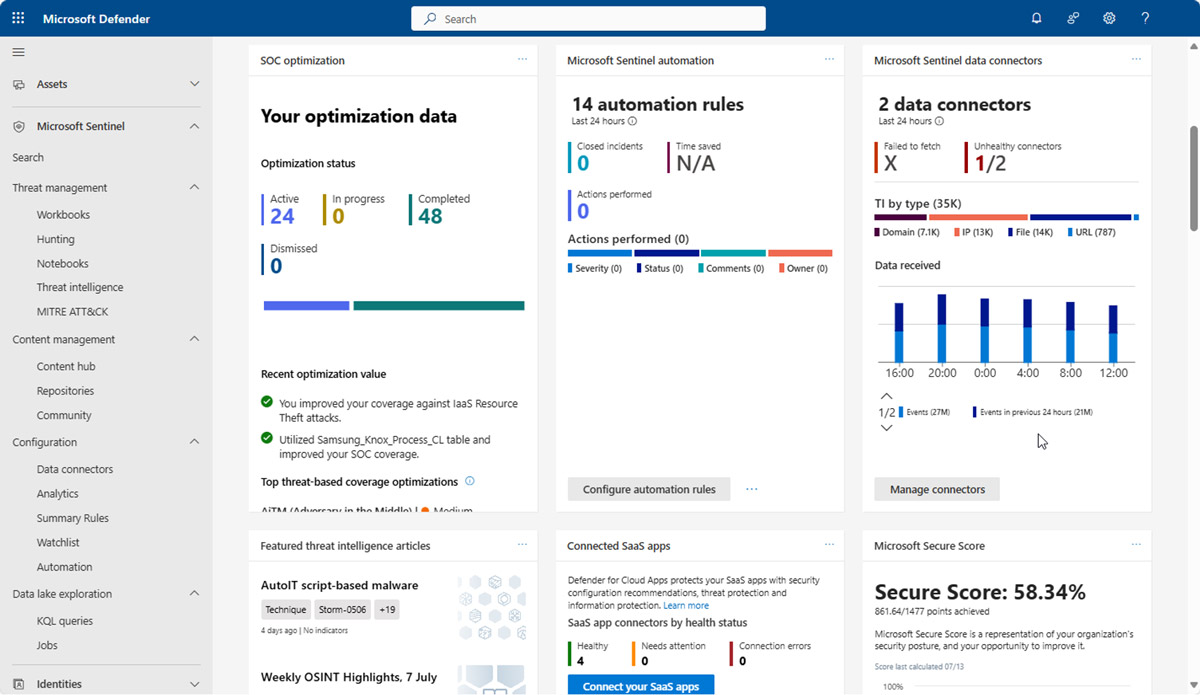
Microsoft Defender Portal preview
Image source: https://learn.microsoft.com/en-us/azure/sentinel/microsoft-sentinel-defender-portal
A major evolution since 2024 is Microsoft’s unified security operations platform, bringing SIEM (Sentinel) and XDR (Defender) into a single analyst experience in the Microsoft Defender portal.
What that means for decision-makers:
- A more streamlined SOC workflow across incidents, investigations, and response
- Stronger correlation across Microsoft signals (identity, endpoint, email, cloud, data)
- A clear roadmap – invest in a platform that Microsoft is actively consolidating and modernizing
Sentinel Data Lake: Retain more data without blowing the budget
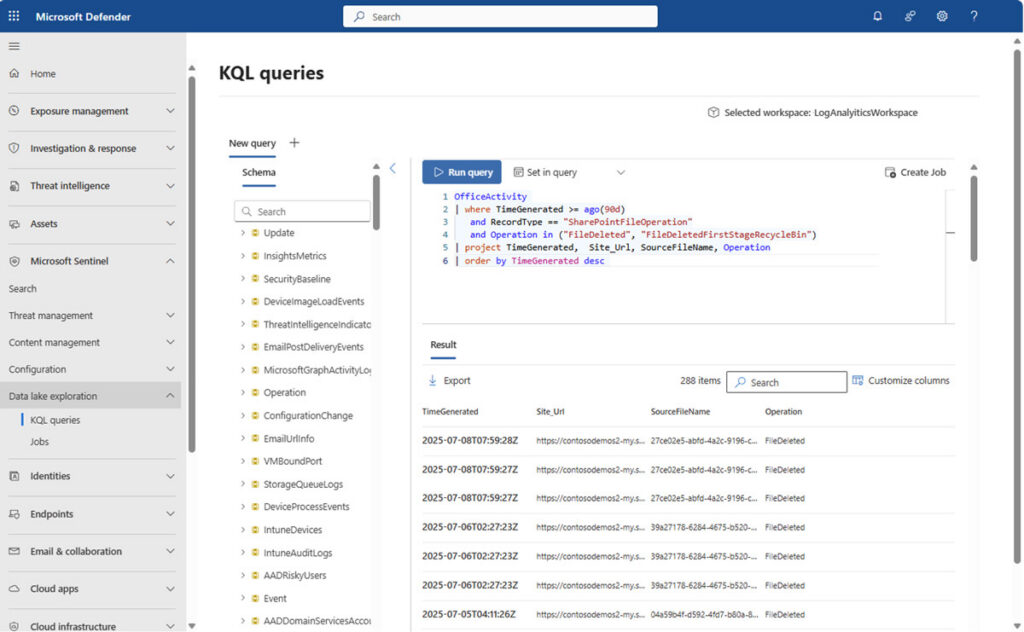
Microsoft Sentinel data lake – KQL queries preview
Image source: https://learn.microsoft.com/en-us/azure/sentinel/datalake/sentinel-lake-overview
A classic SIEM pain point is cost vs. coverage. Teams often drop valuable logs or shorten retention because “hot” analytics storage is expensive.
Microsoft directly addressed this with Microsoft Sentinel data lake, introduced in public preview in July 2025. It is designed to unify, retain, and analyze security data more cost-effectively and make it “AI-ready.”
For many organizations, this is a practical unlock:
- Keep higher-volume telemetry longer (for forensics and delayed detection)
- Reduce SIEM tradeoffs that create blind spots
- Support more advanced analytics and AI experiences without losing historical context
Built-in threat intelligence is getting stronger
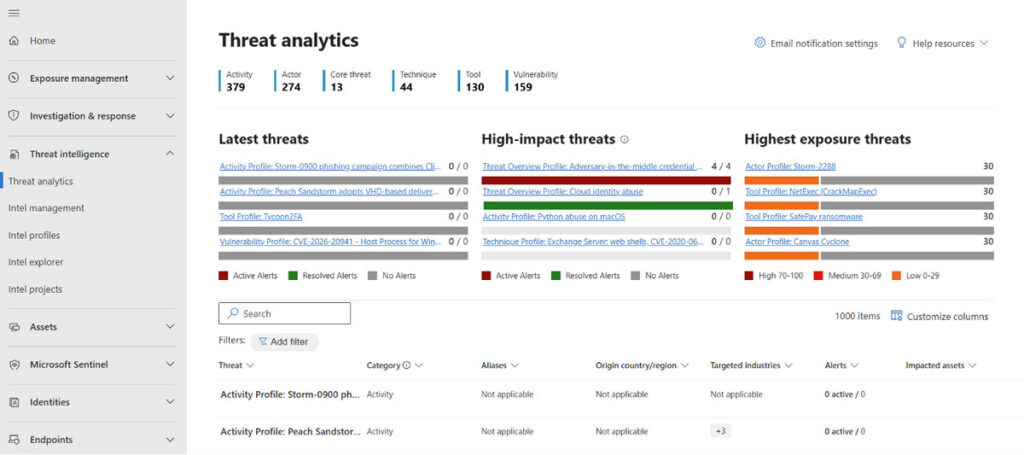
Microsoft Defender Threat Intelligence analytics sample
Microsoft announced that Microsoft Defender Threat Intelligence (Defender TI) is converging directly into Sentinel and Defender XDR, delivering real-time threat intelligence “within a unified SecOps experience at no additional cost.”
This combination provides more effective threat hunting through alert enrichment, investigation context, and better detection accuracy via matching and correlation.
Connector health monitoring to keep the data flowing
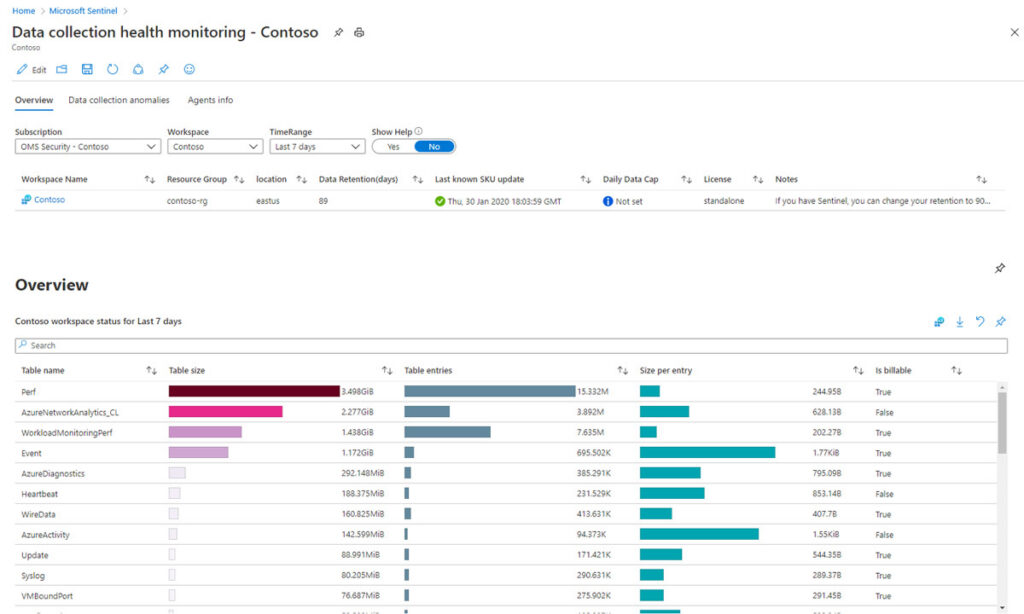
Data connector health in Microsoft Sentinel
Image source: https://learn.microsoft.com/en-us/azure/sentinel/monitor-data-connector-health
Data quality is everything in a SIEM. If your logs stop flowing, your detections quietly degrade. Microsoft has continued to invest in data connector health monitoring, so teams can detect ingestion issues before they become security gaps.
The “agentic AI” direction: Security Copilot, Sentinel Graph, and MC
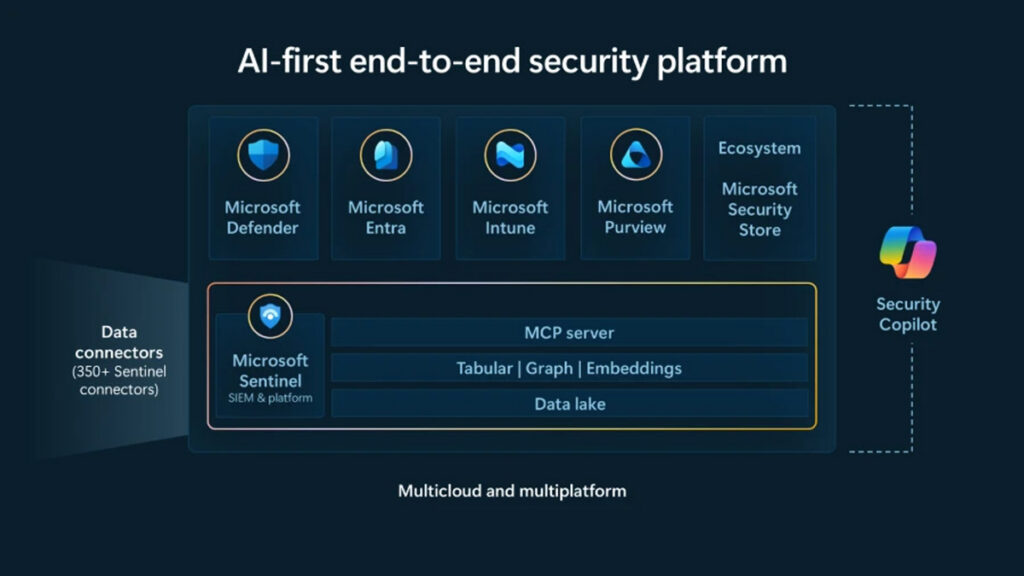
Microsoft Sentinel product roadmap
Image source: https://www.microsoft.com/en-us/security/blog/2025/09/30/empowering-defenders-in-the-era-of-agentic-ai-with-microsoft-sentinel/
Microsoft’s roadmap increasingly centers on AI-assisted (and agent-assisted) security operations. Microsoft’s documentation highlights ongoing updates to Security Copilot and Sentinel integration, including GA milestones and new capabilities:
- Microsoft Sentinel graph to connect security data as relationships, helping defenders “connect the dots” faster
- Microsoft Sentinel MCP (Model Context Protocol) server to enable AI agents to access security context through natural language helping reduce the data engineering burden to build agentic workflows
For IT and security leaders, the takeaway is simple. Sentinel is not standing still as “just a SIEM.” Microsoft is actively evolving it into a future-forward security operations platform where analysts can scale through automation and AI.
Microsoft Sentinel Key Features
Threat Analytics and Detection
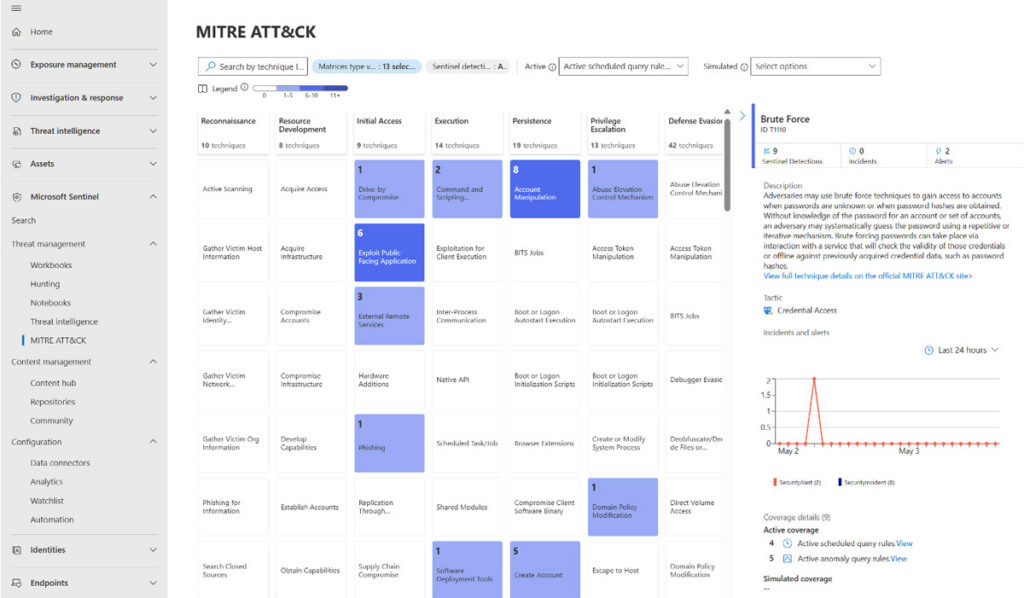
Threat analytics and reporting preview
Image source: https://learn.microsoft.com/en-us/azure/sentinel/overview?tabs=defender-portal
Microsoft Sentinel’s threat detection aims to recognize complex threats. By using anomaly detection and behavioral analytics, the platform finds possible threats and unusual activities that standard methods could miss.
Sentinel’s analytics abilities can allow custom rule creation and alerting, hoping that businesses get appropriate notifications of suspicious activities.
User Entity Behavior Analytics (UEBA)
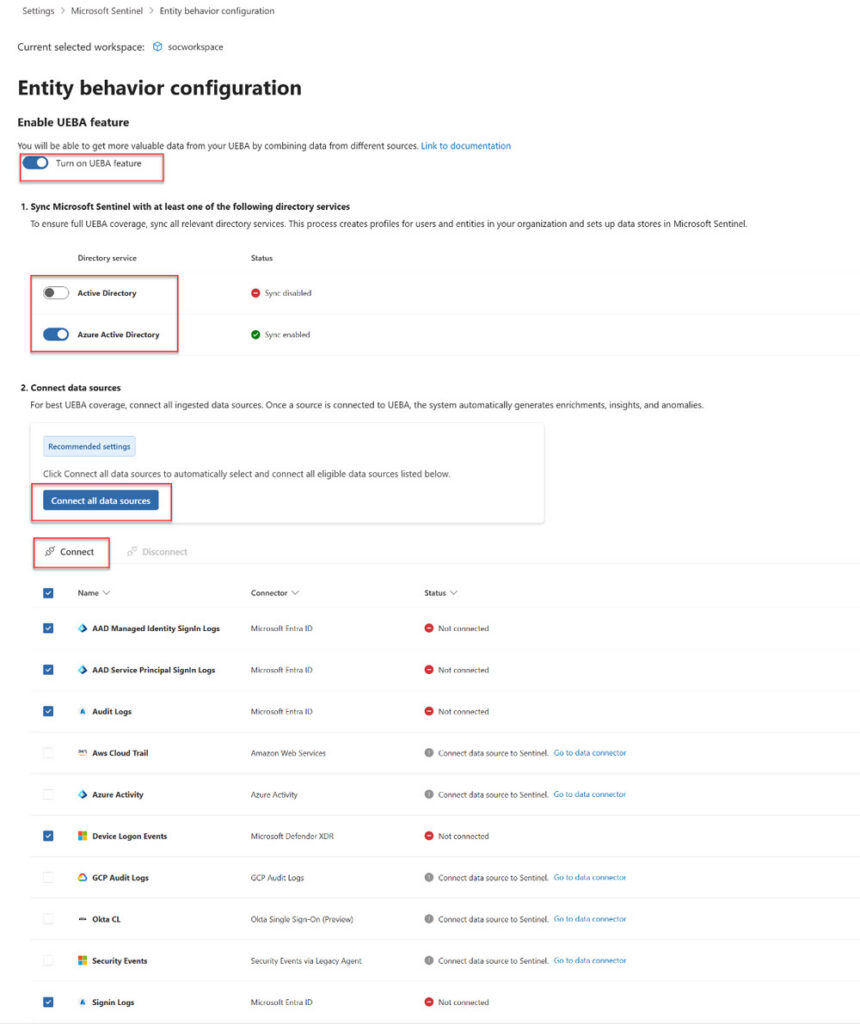
UEBA configuration in Microsoft Sentinel
Image source: https://learn.microsoft.com/en-us/azure/sentinel/enable-entity-behavior-analytics?tabs=defender
User Entity Behavior Analytics (UEBA) in Microsoft Sentinel centers on detecting deviations from typical user actions. Sentinel uses these analytics to possibly spot compromised identities, insider threats, and advanced continuing threats by evaluating patterns in user activities and flagging irregularities.
UEBA offers context around user actions by examining baseline activities together with current behavior metrics. This approach pinpoints irregularities, allowing security teams to swiftly respond to possible breaches.
AI-Powered Investigation
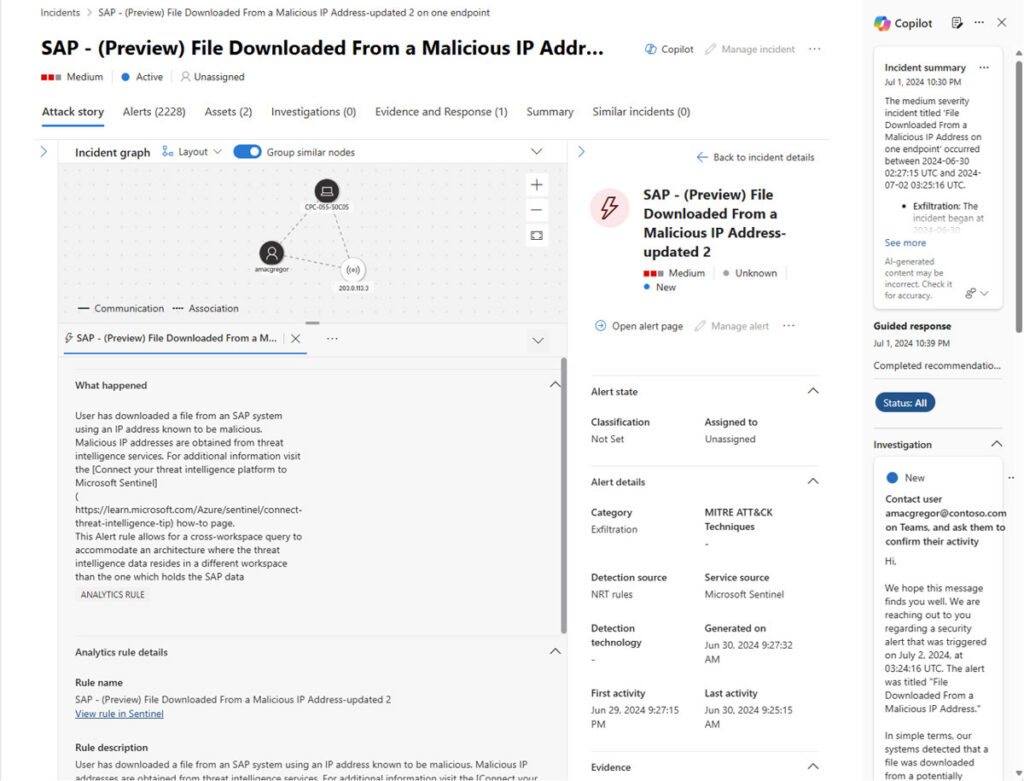
Sentinel AI-powered investigation preview
Image source: https://learn.microsoft.com/en-us/azure/sentinel/sentinel-security-copilot
Sentinel’s AI-powered investigation tools streamline the practice of threat examination and resolution. The use of AI quickens the investigation phase by offering possible insights into attack patterns and potential threat actors. It provides hunting abilities that aim to let analysts search intensely into alerts and associated incidents. Moreover, artificial intelligence is used to automate routine tasks, create incident timelines, and visualize attack sequences.
Data Collection and Integration
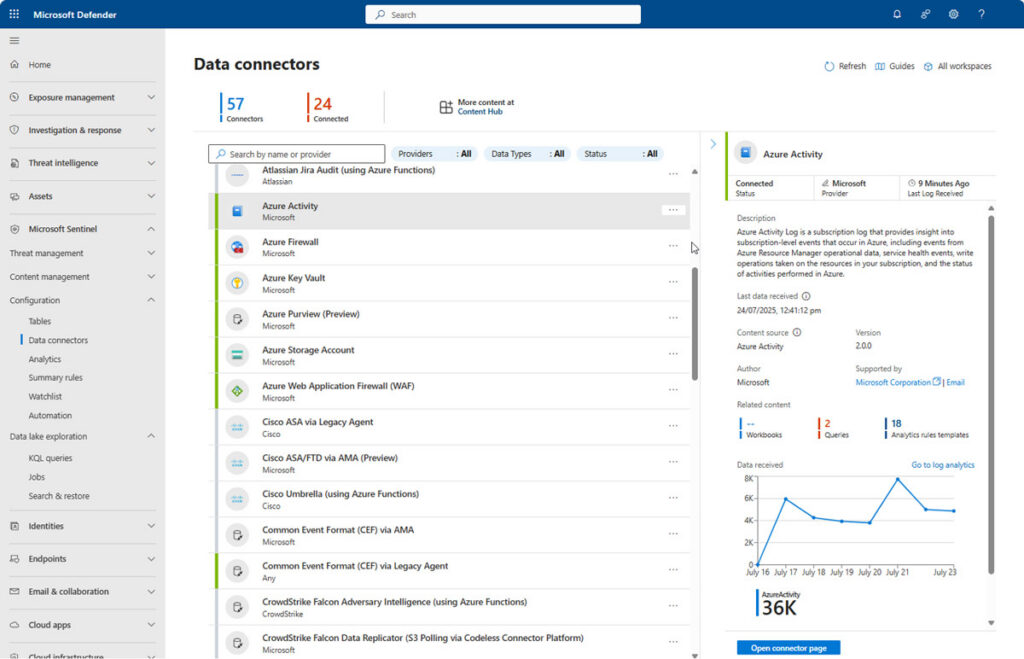
Sentinel data connectors preview
Image source: https://learn.microsoft.com/en-us/azure/sentinel/connect-data-sources?tabs=defender-portal
Microsoft Sentinel supports several connectors, allowing integration among cloud platforms including GCP, Azure, and AWS, as well as on-premises settings. This ability proposes to give visibility into possible threats. Sentinel’s capacity to incorporate signals and logs without extra infrastructure investment proves useful for security monitoring in a wide variety of IT settings.
Data collected by Microsoft Sentinel is enhanced and normalized to improve threat detection and incident analysis. This procedure includes parsing, tagging, and connecting data automatically, which simplifies security operations.
Automated Incident Response with Playbooks
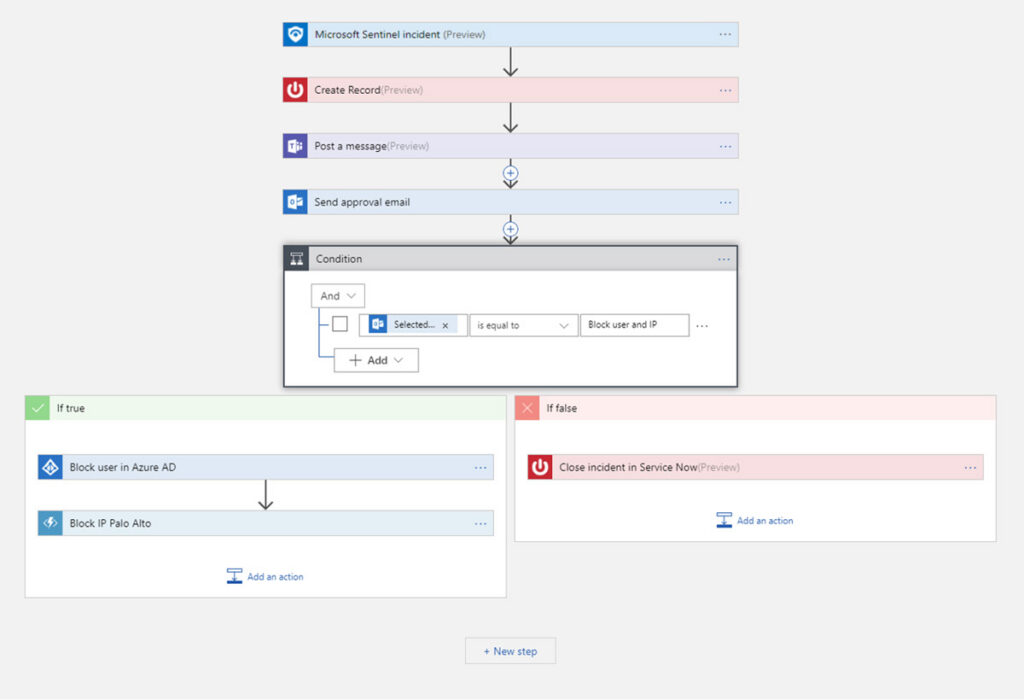
Sentinel playbooks in Azure Logic Apps
Image source: https://learn.microsoft.com/en-us/azure/sentinel/overview?tabs=defender-portal
SOAR automated incident response in Microsoft Sentinel is fueled by playbooks that regulate response attempts. These playbooks are sets of procedures implemented automatically in response to particular incidents. Similar to playbooks from other vendors, they are proposed to reduce response times and lessen human intervention needed during vital periods.
Automation aims to let businesses handle a greater volume of alerts. By using pre-defined workflows built in Azure Logic Apps, Sentinel expects that every incident is handled reliably while decreasing human error.
How Microsoft Sentinel Counters Threats
As a full SIEM/SOAR, one-stop solution, Microsoft Sentinel is efficient in identifying, examining, and responding to the complete range of cyberattacks and threat actors. But while Sentinel offers dependable protection from botnets, phishing attacks, malware, and more, it might be even more critical in countering some of the latest and most advanced threats.
Remote work/hybrid office attacks – With new remote work/hybrid office expectancies after the coronavirus pandemic, crucial business data is not limited to business devices and networks. Microsoft Sentinel broadens critical security resources to remote work settings, safeguarding data where it’s mostly at risk.
Credential stuffing – Security experts keep on warning users to change their passwords. With that being said, many individuals continue to use the same passwords to log into different accounts and devices, putting them at a certain risk of bot-driven credential attacks focused on stealing login credentials. Sentinel recognizes the obvious signs of credential stuffing and other identity attacks, blocking out threat actors and notifying response teams.
Double extortion ransomware – One of the highest risks to data security is the double extortion ransomware attack, in which hackers gain control of a business’s systems and command payment in exchange for giving access back to the correct owners. Microsoft Sentinel uses a correlation engine centered on scalable machine learning algorithms to decide whether security alerts are connected to potential ransomware activity.
Microsoft Sentinel implementation support from Arctic IT
Buying a SIEM is the easy part. Making it effective is where most programs succeed…or stall.
Arctic IT helps organizations avoid the two most common SIEM outcomes:
- “We turned it on, but it’s noisy and no one trusts it.”
- “We don’t ingest enough data to see the full picture.”
Arctic IT’s value-added approach
1) SIEM readiness + design that fits your business
We start by aligning Sentinel architecture to your environment and priorities:
- What are your top risk scenarios?
- What telemetry is missing today?
- What response actions should be automated vs. analyst-driven?
2) Rapid onboarding with the right data, not all the data
Sentinel’s value comes from the right signals at the right fidelity. We help you:
- Prioritize data sources
- Normalize and enrich data to improve correlation
- Build a scalable ingestion strategy
3) Detection engineering that improves outcomes
We focus on detection content tuned to:
- Your environment and your “normal”
- MITRE ATT&CK-aligned scenarios
- High-confidence, actionable incidents
4) Automation that reduces time-to-containment
Arctic IT designs playbooks that match your operational reality:
- Automated enrichment (asset/user context, threat intel lookups)
- Triage workflows and ticketing integration
- Containment steps with appropriate approvals
If you’re evaluating a SIEM, or you already own Sentinel but want to get more value from it, Arctic IT can help.
As a leading Microsoft Solutions Partner and Microsoft Cloud migration services provider, Arctic IT integrates Sentinel to help you move from “logging” to measurable detection and response outcomes. Connect with us today to learn how we can help you implement and maximize Microsoft Sentinel.

By Phillip Jackson, Chief Information Officer at Arctic IT