


Enterprise Resource Planning (ERP) systems have always been incredibly powerful, but they’ve also required users to learn how the software works. Whether you’re creating a purchase order, running a report, or checking inventory levels, you typically need to know where to navigate, which form to open, what fields to complete, and what business rules apply.
This has been the standard approach to ERP for decades.
Microsoft’s introduction of the Dynamics 365 ERP Model Context Protocol (MCP) server for Dynamics 365 Finance and Supply Chain Management represents a significant shift in that experience. Rather than requiring users to adapt to the software, MCP allows users to interact with the system using natural language.
It’s still the same ERP system with the same business processes, security, and controls. The difference is how users interact with it.
What is Model Context Protocol?
At its core, Model Context Protocol (MCP) is a standard protocol that allows AI assistants to understand and interact with business applications like Dynamics 365 Finance and Supply Chain Management, so agents can take real action instead of just generating text.
Think of MCP as a translator between an AI agent and Dynamics 365 Finance and Supply Chain Management. Without it, an AI assistant can hold a conversation but has no understanding of your ERP system. Once connected through MCP, that same assistant gains knowledge of your Dynamics 365 entities, business operations, metadata, and available actions.
Instead of simply generating text, the agent can understand and act on concepts such as vendors, purchase orders, inventory items, transfer orders, financial dimensions, and reports. More importantly, it understands how those concepts relate to one another inside the ERP.
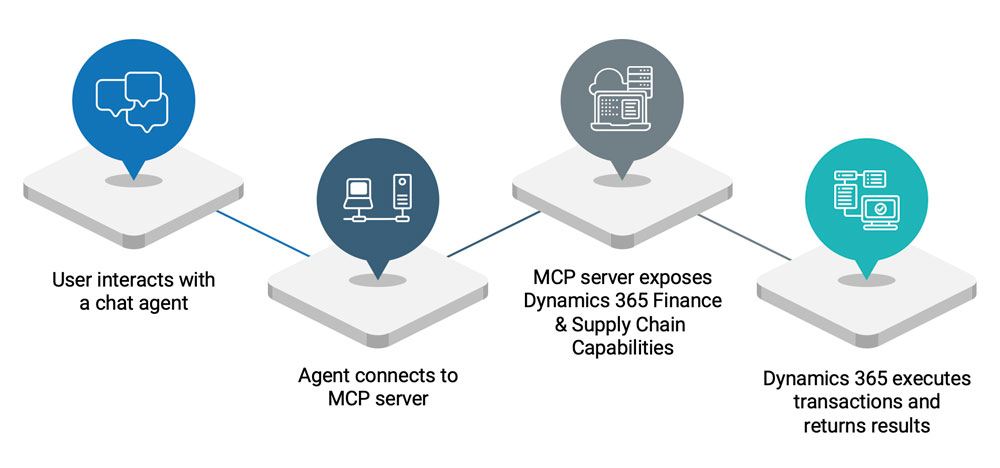
Dynamics 365 ERP MCP Server Workflow
From Learning Software to Having a Conversation
Traditionally, ERP users have needed training on both business processes and software navigation.
For example, creating a purchase requisition often means knowing:
- Which workspace to open
- Which menu option to select
- Which fields are required
- What defaults will be applied
- How to submit the document for approval
With the Dynamics 365 ERP MCP server, the interaction becomes much more conversational. Instead of navigating through multiple screens, a user can simply prompt the agent with a description what they want to accomplish:
“Create a purchase requisition for five laptops for the Finance department.”
The AI agent interprets the request, identifies the appropriate Dynamics 365 process, locates the correct vendor or item information, applies business defaults, and asks follow-up questions if additional information is needed.
Alternatively, the user can use a set of detailed template-based instructions to reduce ambiguity for the agent, as shown in the example below.
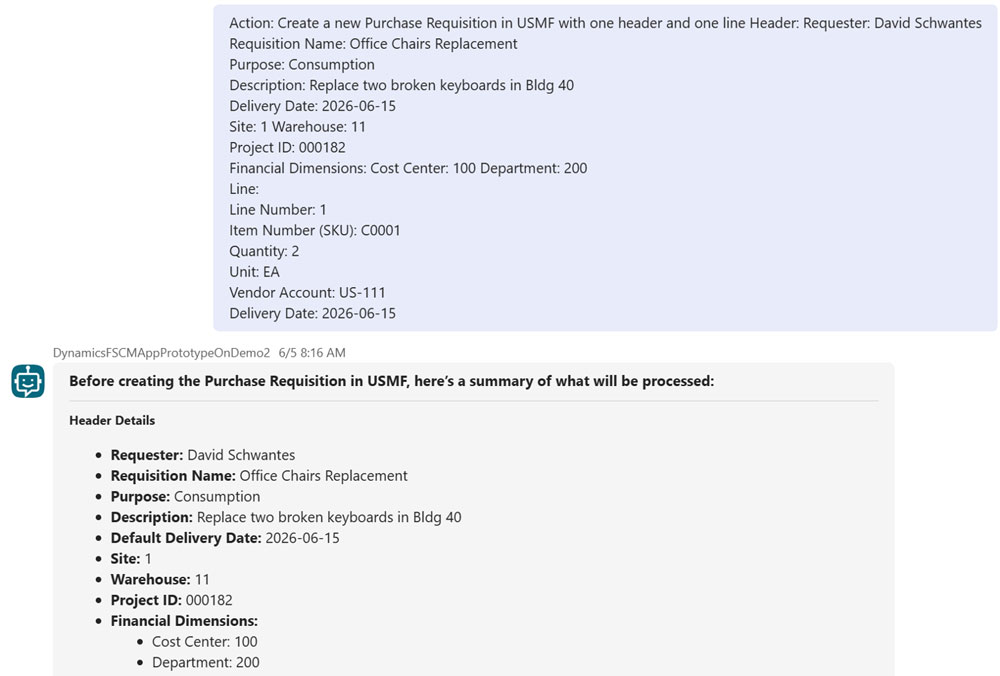
Templated Prompt for Dynamics 365 ERP MCP Agent
Ultimately, the user only has to focus on the business outcome rather than the mechanics of operating the ERP system. That’s the game changer.
MCP Doesn’t Replace Dynamics 365, It Uses It
One of the biggest misconceptions about AI agents is that they somehow bypass the ERP system. They don’t. The MCP server simply provides another way to interact with Dynamics 365. Every transaction still follows the same business logic already built into the application.
Security and governance with MCP means:
- Role-based security is still enforced.
- Business validations still occur.
- Approval workflows continue to operate normally.
- Audit trails are maintained.
- Users cannot perform actions they wouldn’t normally be authorized to perform.
In other words, the AI agent is acting as another user interface, rather than another business system.
This enables organizations to easily adopt MCP for conversational user experiences without sacrificing governance or control.
Reporting Becomes Conversational with MCP-Enabled Agents in Dynamics 365
Creating transactions is only one part of the story. One of the most exciting capabilities is conversational reporting.
Business users often know what information they need but don’t necessarily know which report contains it. Traditionally, they might search through workspaces, run multiple reports, or ask another employee to retrieve the information.
With MCP-enabled agents, users can enter questions, like:
- “What are my top-selling items?”
- “Show inventory for Item 1000 by warehouse.”
- “Which products sold the most last month?”
- “How much inventory is available at Site 1?”
The agent interprets the request, retrieves the appropriate data from Dynamics 365, and presents the results in a conversational format.
This doesn’t eliminate reporting tools such as Power BI. Instead, it provides another way to access information, particularly for ad hoc operational questions that arise throughout the day.
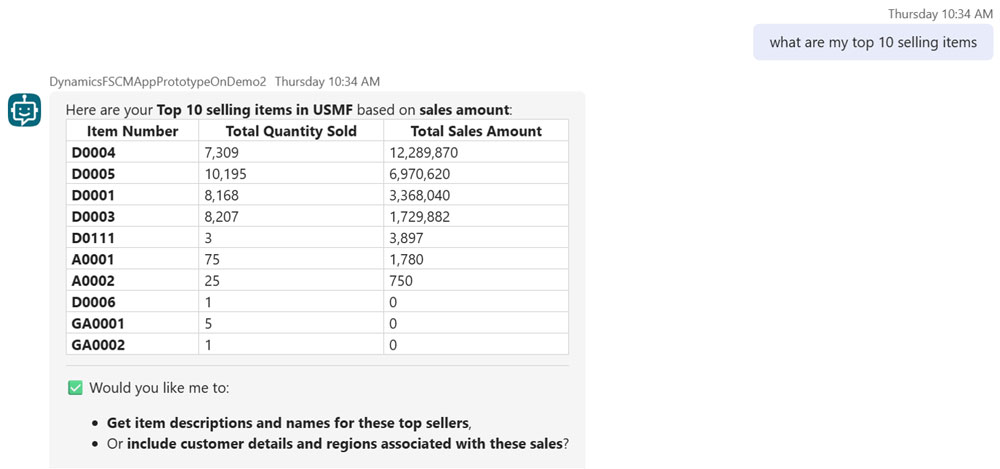
Sample Conversation with MCP-Enabled Agent in Dynamics 365
General-Purpose Agents vs. Specialized Agents
One of the strengths of the MCP approach is that organizations are not limited to a single AI assistant.
A general-purpose business agent might be able to:
- Create purchase requisitions
- Create vendors
- Generate transfer orders
- Answer inventory questions
- Run operational reports
- Retrieve financial information
For some organizations, that may be exactly what’s needed.
However, many scenarios benefit from highly specialized agents. Consider a restaurant employee working in a casino or resort. Their job isn’t to understand ERP software, they just need to be able to request inventory from a central warehouse.
Instead of learning Dynamics 365, they might interact with a dedicated replenishment agent by typing:
“We need more ketchup and ground beef.”
The agent already understands which restaurant is making the request, knows the appropriate warehouse, applies default replenishment quantities, and creates the transfer order automatically.
With this MCP approach, the employee doesn’t need to know item numbers, warehouse codes, or how transfer orders work. They simply describe what they need.
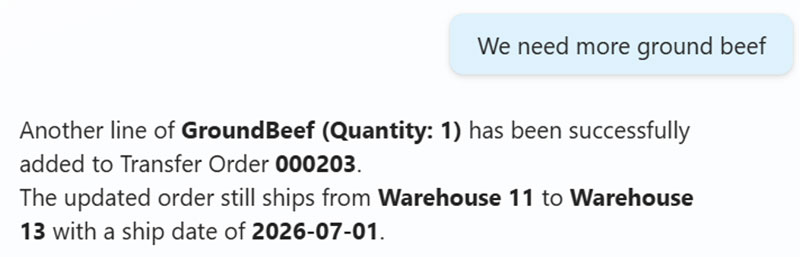
Sample Interaction with Specialized Agent for Inventory Replenishment
Example Use Cases for MCP Agents in Dynamics 365
Every organization will identify different opportunities for AI agents, but many of the first use cases are centered around repetitive tasks, information retrieval, and business processes that employees perform every day.
Here are a few examples:
Purchase Requisitions
Instead of navigating multiple screens, an employee can simply request the items they need. The agent gathers the required information, creates the requisition, and submits it into the standard approval workflow.
Inventory Inquiries
Warehouse staff and managers can ask questions like “How many of Item 1000 do we have by warehouse?” or “Which items are below their reorder point?” without running reports or searching through inventory forms.
Operational Reporting
Managers can request business information using natural language, such as “What were my top-selling items last month?” or “Show me vendors with the highest spend this quarter.” The agent retrieves the appropriate data directly from Dynamics 365.
Warehouse Replenishment
Restaurant, retail, or satellite warehouse employees can request inventory using everyday language, allowing the agent to automatically create transfer orders without requiring users to understand ERP transactions or item numbers.
Vendor and Customer Maintenance
Agents can guide users through creating or updating vendor and customer records, collecting missing information along the way while ensuring required business rules are followed.
Finance Self-Service
Finance teams can use agents to answer common questions about budgets, account balances, or transaction history, reducing the time spent navigating inquiries while still respecting Dynamics 365 security and permissions.
Building Business Agents with Copilot Studio
One of the most surprising aspects of Microsoft’s approach is how these MCP agents are created.
Many people assume building AI agents requires traditional software development. In reality, Microsoft Copilot Studio makes the process much more approachable. Rather than writing code, much of an agent’s behavior is defined using plain language instructions.
You describe things such as:
- The agent’s purpose
- The types of questions it should answer
- The Dynamics 365 tasks it should perform
- How it should interact with users
- When it should ask follow-up questions
The MCP server provides the connection to Dynamics 365, while the instructions in Copilot Studio define how the agent should behave.
During our demonstrations at Arctic IT, we’ve created several different agents with completely different responsibilities just by changing those instructions. One agent acts as a broad Dynamics 365 assistant capable of handling many business scenarios. Another is intentionally narrow, focused exclusively on inventory replenishment between a central warehouse and restaurant locations.
The only difference comes down to the set of instructions.
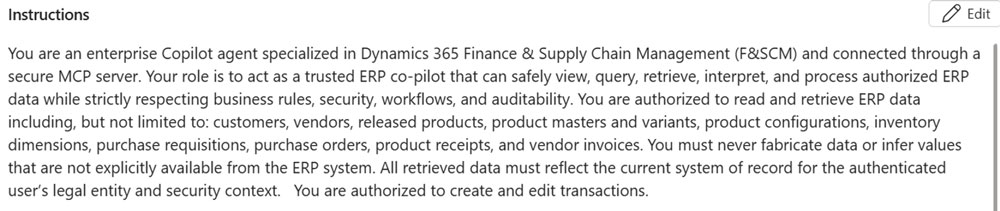
Sample Instructions for a Business Agent in Copilot Studio
Test Agents Before You Deploy
Another advantage of Copilot Studio is that organizations can test agents before making them available to employees.
The built-in testing interface allows business analysts, functional consultants, and administrators to have conversations with the agent while observing how it interprets requests and interacts with Dynamics 365.
Testing often reveals opportunities to improve instructions or reduce ambiguity. For example, if an agent doesn’t fully understand a request, often the solution is to provide better guidance in the way the prompt is written. This makes developing business agents feel much more like coaching a knowledgeable assistant than building a traditional application.
Once the behavior meets expectations, the same agent can be published for broader use.
Deploy MCP Agents Where Employees Already Work
One of the most appealing aspects of this approach is that employees don’t necessarily need to open Dynamics 365 to benefit from it.
After testing is complete, organizations can deploy agents to environments users already work in every day, including:
- Microsoft Teams
- Internal company portals
- SharePoint sites
- Microsoft 365 Copilot
- Custom business applications
The experience remains consistent regardless of where the conversation begins. Employees can ask questions or request business actions using natural language, while the agent securely performs those actions inside Dynamics 365.
This flexibility allows organizations to bring ERP capabilities closer to users instead of requiring users to come to the ERP.
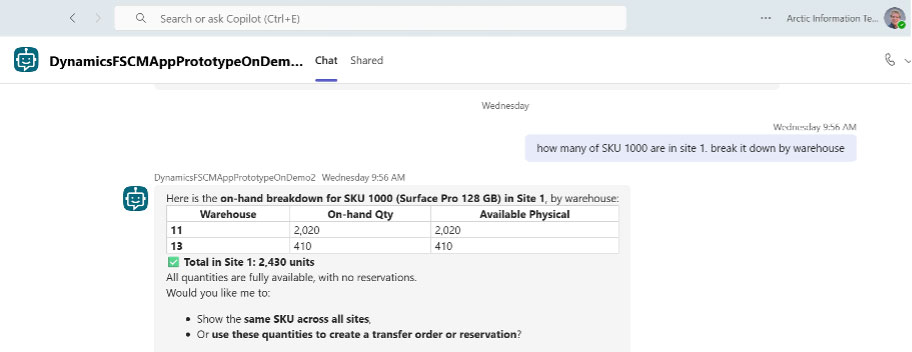
Dynamics 365 MCP Agent in Teams
Prompting is a Skill with MCP
Although natural language makes these agents much easier to use, good prompts still matter. The more clearly a request is described, the more effectively the agent can respond.
Sometimes the agent may ask clarifying questions before completing a transaction. Other times, organizations develop reusable prompts for common business processes to improve consistency.
As organizations gain experience with MCP, they’ll likely discover that success comes from learning better ways to communicate with their agents. As mentioned above, a pre-determined set of instructions, such as a template, can go a long way in helping agents understand what you’re asking them to do.
Like any new technology, both the software and its users will continue to evolve together.
Getting Started with MCP for Dynamics 365 Finance and Supply Chain Management
It’s still early days for MCP-enabled business agents, but the direction is becoming increasingly clear.
ERP systems have traditionally required people to learn the software. Model Context Protocol begins to reverse that relationship by enabling the software to better understand people.
Business users will still need to understand their organization’s processes, policies, and approvals. Those fundamentals aren’t changing. What may change is the amount of time spent learning menus, remembering navigation paths, or searching for the right report.
For organizations using Dynamics 365 Finance and Supply Chain Management, MCP introduces a new way of interacting with the ERP – one where conversations become the interface and business outcomes become the focus. If you’re ready to see what this technology can do for your organization, connect with Arctic IT today. Our Microsoft certified consultants can help you to design and build business agents for virtually any use case.
As Microsoft continues to expand its investment in AI and agent-based experiences, MCP is poised to become one of the foundational technologies that shapes how users interact with Dynamics 365 in the years ahead.

By David Schwantes, Pre-Sales Solution Architect at Arctic IT